Using the Legacy and New Omnichannel Solutions - Coexistence Mode
If your Chargebee site uses Mobile Subscriptions (Legacy), you can enable Omnichannel Subscriptions on the same site without turning off the legacy integration. Both solutions can run together while you adopt Omnichannel at your own pace and eventually retire the legacy integration.
This page explains what running both solutions together means, how subscription sync and webhooks behave for Apple and Google, and frequently asked questions about cutover. For the step-by-step rollout from test site to live migration, see Phased Migration from Legacy to Omnichannel Solution. To compare how the two solutions work, see Legacy Vs New Solution.
Running both solutions on the same Chargebee site
Running both solutions together means the Mobile Subscriptions (Legacy) and the Omnichannel solutions are both active on the same Chargebee site at the same time.
When both solutions are active on the same site, in-app subscriptions continue to be represented as regular Chargebee subscriptions with a channel attribute (for example, app_store or play_store) in the legacy solution and the same are represented as Omnichannel subscriptions with a source attribute (for example, apple_app_store or google_play_store) in the new solution.
How to activate legacy and new solutions on the same Chargebee site
To activate both solutions on the same Chargebee site, follow the steps below:
-
Get the new Omnichannel solution enabled in coexistence mode on your Chargebee site by reaching out to Chargebee Support.
-
Connect your apps again to the Chargebee site where the legacy solution is already live. For reconnecting the apps, follow the steps mentioned here for Apple App Store and the steps mentioned here for Google Play Store.
-
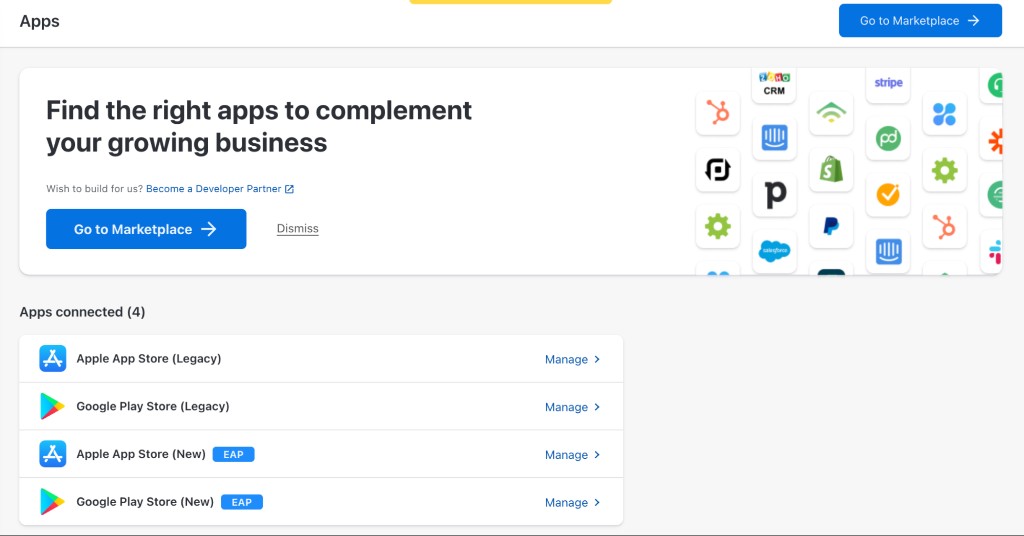
After you connect your apps to Omnichannel, both new and legacy app store integrations appear under Apps on your Chargebee site. You can click any of these store integrations to check the apps connected for each of these stores.
-
After connecting your Apple apps, no changes are required to the notification URL in App Store Connect. Chargebee automatically syncs webhook notifications from the legacy solution to the new solution, enabling lifecycle management of Omnichannel subscriptions.
-
After connecting your Google apps, subscribe the Omnichannel notification URL to the existing Pub/Sub topic used by the legacy solution. This ensures Google webhook notifications are delivered to both solutions, enabling lifecycle management of Omnichannel subscriptions. Learn more
How subscription creation works while both solutions run together
When both legacy and new solutions are connected to the same Chargebee site, new subscriptions created in the legacy solution are automatically recorded in the new Omnichannel solution as well. You do not need to change your existing mobile SDK implementation or stop calling the process purchase command API for legacy-originated purchases. Below are the details on how both solutions work simultaneously:
-
When a subscription is created in the legacy solution through a mobile SDK purchase method or the process purchase command API, Chargebee auto-creates the corresponding Omnichannel subscription. You do not need to call the Record a Purchase API for those legacy-originated purchases to appear in Omnichannel. Learn more.
-
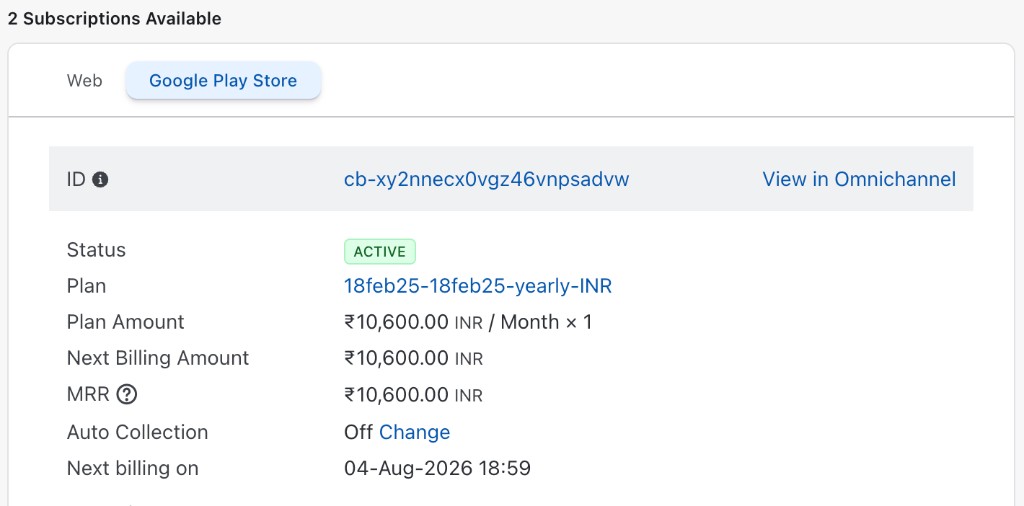
At the customer level, you can view the legacy subscription and follow the link to the corresponding Omnichannel subscription in the new solution.
How subscription lifecycle management works while both solutions run together
Apple App Store subscription lifecycle management
For Apple apps, no additional notification setup is required. Keep the notification URL in App Store Connect the same as the one generated in the legacy solution.
When the legacy solution receives any webhook notification from Apple through the webhook URL configured in App Store Connect, Chargebee internally routes this Apple store notification to the new Omnichannel solution. This ensures that the subscription state management is taken care of in both legacy and new solutions without any changes to notification URL setup in App Store Connect.
Google Play Store subscription lifecycle management
For Google apps, subscribe the Omnichannel solution's notification URL generated by Chargebee to the existing Pub/Sub topic you already use for the legacy solution. This should be an additional subscription on the already existing topic rather than creating a separate topic.
Follow the steps in Set Up Notification URL in Google Cloud Platform for Subscription State Sync with Chargebee and Create subscription to the topic with Chargebee's notification URL, using the notification URL generated for your Omnichannel-connected Google app.
Once this setup is done, notification events from Google Play Store are consumed by both legacy and new solutions. This ensures that the subscription state management is taken care of in both legacy and new solutions.
Phased rollout to full migration
To migrate from running both solutions together on the same Chargebee site to the Omnichannel solution fully, a four-phase migration plan is recommended:
- Set up both solutions on your test site
- Enable both on your live site
- Implement the new Omnichannel webhook events
- Complete live migration and update notification URLs
Note
Each phase includes specific steps for Apple and Google sync notification setup, and validation checkpoints.
See Phased Migration from Legacy to Omnichannel Solution to understand this fully.
Frequently asked questions
Which Chargebee webhook events should I listen to while both solutions run together?
While both solutions run together, and you haven’t implemented the Omnichannel webhook events, continue listening to regular Chargebee subscription webhook events. Refer to this link to understand the mapping between Apple and Google store events and Chargebee webhook events.
After successful testing of your downstream implementation with Omnichannel webhook events, you can switch listening to new Omnichannel webhook events.
How do I avoid duplicate webhook events while both solutions run together?
While both solutions run together, Chargebee can emit both legacy and Omnichannel events for the same subscription activity. If you only want to act on Omnichannel events for synced subscriptions, you can ignore legacy events that include Apple or Google channel information for those subscriptions.
Subscriptions synced from legacy to Omnichannel automatically as they are created additionally emit an omnichannel_subscription_created event. Plan your webhook handlers so that acting on both the legacy creation event and the Omnichannel creation event does not duplicate downstream actions such as provisioning or analytics updates.
What happens to legacy webhook events when migration is complete?
Until you change the notification URLs for your apps from the legacy integration to the Omnichannel integration in Chargebee (for both Apple and Google), which should only happen after full migration, both solutions continue to run together and both legacy and Omnichannel events can fire for subscriptions.
After you update notification URLs to point to Omnichannel (Phase 4, step 3), Chargebee receives store notifications only through the Omnichannel integration. You receive Omnichannel events only; legacy events stop because the legacy solution no longer receives notifications from Apple or Google. There is no separate legacy cancellation event at cutover — legacy events simply stop.
What are the prerequisites for full migration of existing subscriptions?
Full migration imports existing legacy subscriptions into Omnichannel and removes them from the legacy solution. Treat the following as prerequisites before you proceed:
Warning
Full migration of existing subscriptions deletes all subscriptions and associated data in the legacy solution. Confirm that your organization accepts this data removal before you proceed.
Before full migration:
- All end users must be on the new app version built on StoreKit 2.0 (Apple) and the Omnichannel purchase flow (Apple and Google).
- All downstream use cases must be satisfied by Omnichannel webhook events — access control, reporting, customer support, and any other workflows that currently rely on legacy in-app purchase events.
- Move to App Store Server Notifications V2 for Apple if you currently use V1 notifications. We recommend configuring App Store Server Notifications V2 in App Store Connect before full migration if your Apple integration still uses App Store Server Notifications V1.
For self-service full migration, invoke the Record a Purchase API in a script and respect Chargebee and store rate limits. Stagger large volumes — for example, import roughly 30,000–50,000 subscriptions at a time when migrating Google Play subscriptions, due to Google API limits.
See the Omnichannel Subscriptions Migration Guide for Apple and Google rate-limit details, or work with Chargebee Support for an assisted migration. You can also use Importing Historic Data for bulk import workflows where applicable.
Related documentation
- Phased Migration from Legacy to Omnichannel Solution
- Omnichannel Subscriptions overview
- Apple App Store — legacy coexistence
- Google Play Store — Omnichannel setup
- Omnichannel Subscriptions Migration Guide
- Importing Historic Data
See also
Was this article helpful?