UPI via Stripe
This feature is a Private Beta release. Contact Chargebee Support to enable UPI via Stripe for your live and test sites.
Chargebee supports Unified Payments Interface (UPI) through the Stripe payment gateway, letting you offer Indian customers a familiar, bank-native payment experience at checkout.
UPI is a real-time payment system governed by the National Payments Corporation of India (NPCI). When a customer selects UPI during checkout:
- On desktop, a QR code is displayed for the customer to scan using any UPI-enabled app (such as Google Pay, PhonePe, or Paytm).
- On mobile, Stripe automatically hands off to an installed UPI app so the customer can authorize without scanning a QR code.
- The customer authorizes the payment and mandate directly in their UPI app—no redirect to an external payment page.
- On successful authorization, Chargebee sets up a recurring mandate so future subscription renewal charges up to ₹15,000 can be collected automatically in the background.
For more information on how Stripe handles UPI, see Stripe's UPI documentation.
Key features
- Supports subscription payments and one-time charges.
- Supports INR (Indian Rupee) as the payment currency.
- Saves the payment method as a mandate for automatic future collections (MIT).
- Compatible with:
- In-app checkout
- Full-page checkout
- Self-serve portal (edit subscription; standalone add payment method is not supported)
- Chargebee.js
- APIs
Prerequisites
Before you set up UPI in Chargebee:
- Stripe is configured as a payment gateway in Chargebee.
- UPI is enabled in your Stripe account. Contact Stripe to activate UPI for your live account.
- Your Chargebee site is configured to collect payments in INR.
Configure UPI via Stripe in Chargebee
To enable UPI payments through Stripe in Chargebee:
- Log in to your Chargebee Billing site.
- Go to Settings > Configure Chargebee > Payment Gateway.
- Select Stripe from the list of configured gateways.
- On the Configure Stripe page, turn on Unified Payments Interface (UPI).
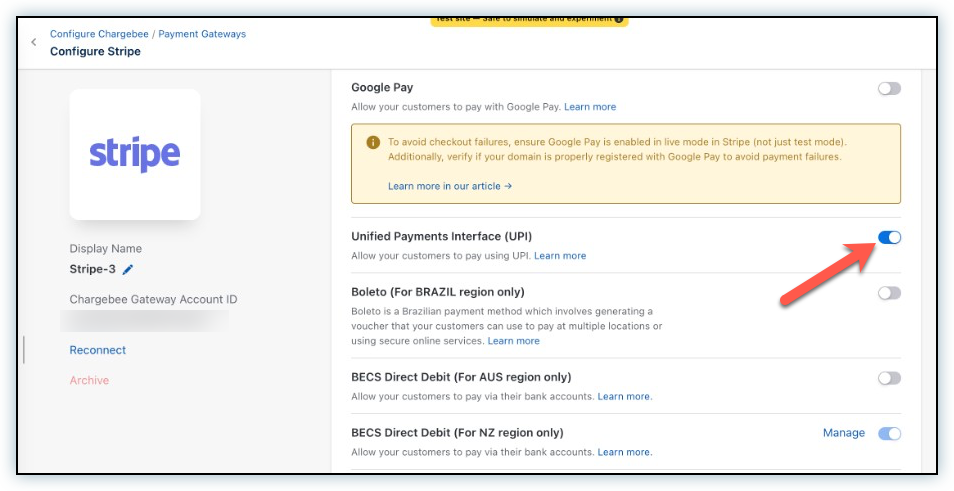
- Click Apply to save your changes.
Configure Smart Routing
To ensure INR payments route to the correct Stripe gateway for UPI:
- Go to Settings > Configure Chargebee > Payment Gateways.
- Select Smart Routing.
- Under the For UPI section, set the rule to route INR payments to your Stripe gateway.
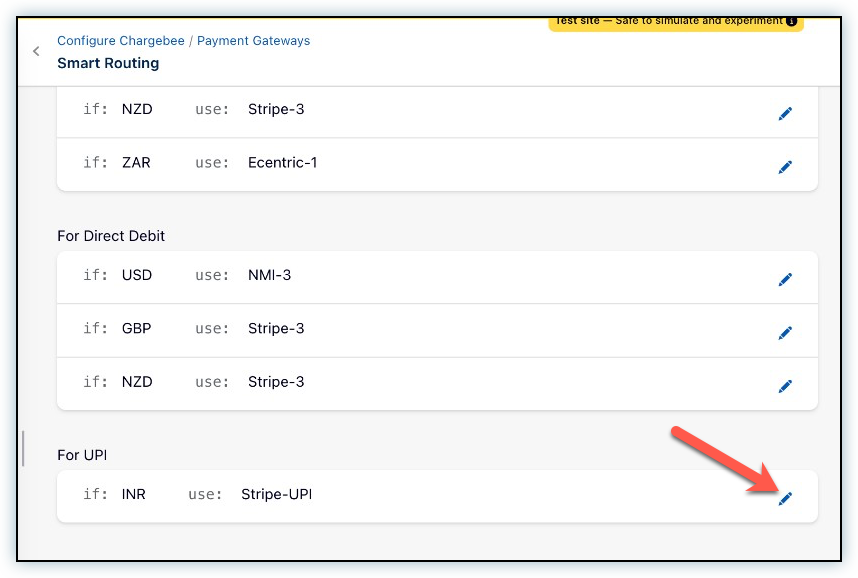
Configuring webhooks
To keep your Chargebee–Stripe integration in sync, configure webhooks in Stripe. Webhooks let Chargebee receive real-time updates from Stripe when important events occur.
For this integration to work correctly, enable the following events:
This event notifies Chargebee when a refund is updated in Stripe, so refund status is reflected accurately in your Chargebee account.
Checkout flow
Your customer completes the following steps at checkout when subscribing with UPI via Stripe:
- The customer reviews the order details on the Your order page and clicks Proceed To Checkout.
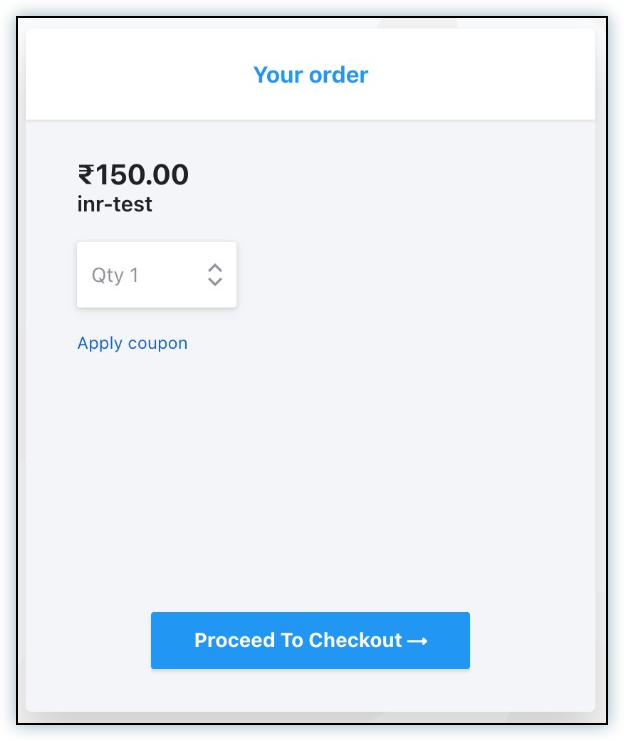
- The customer enters their email address and clicks Next.
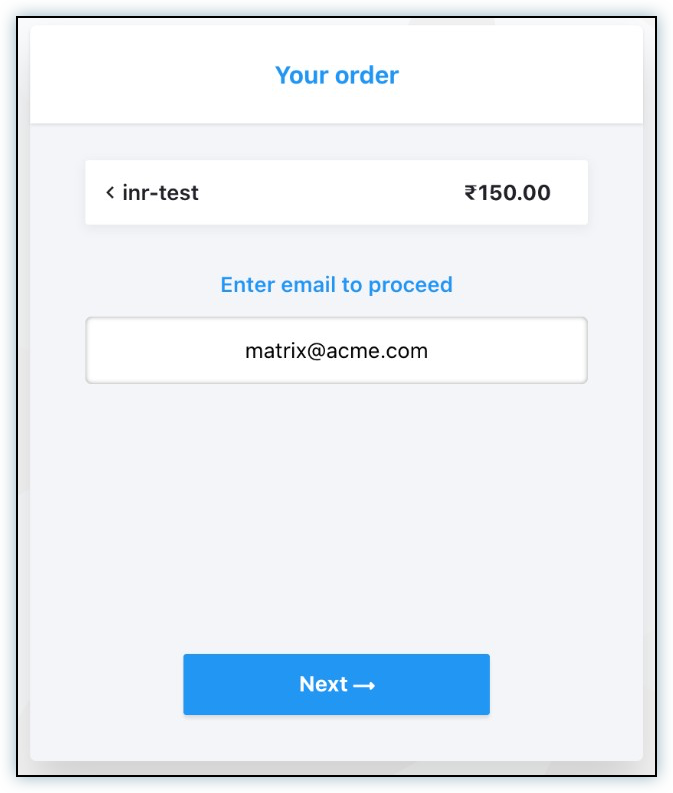
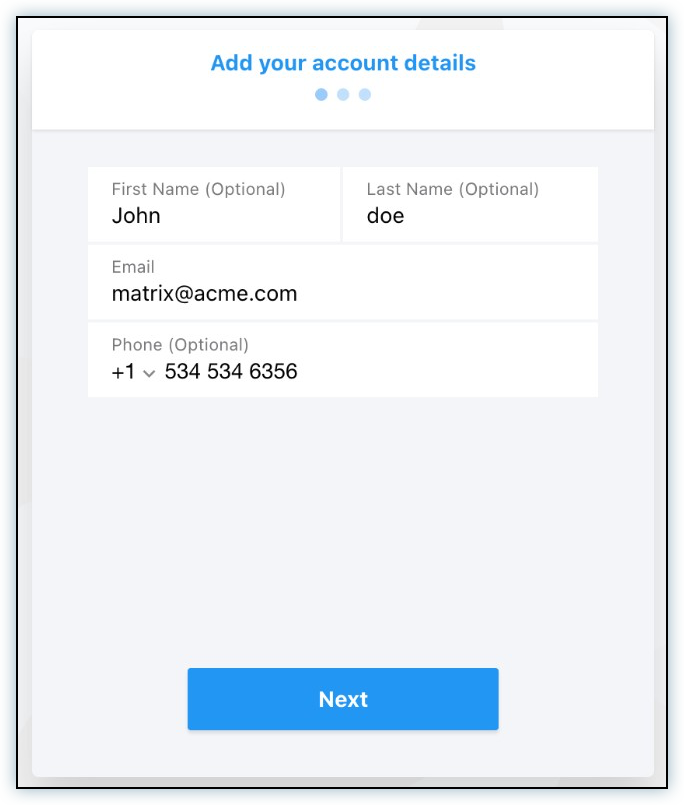
- The customer enters their account details—name and phone number—and clicks Next.
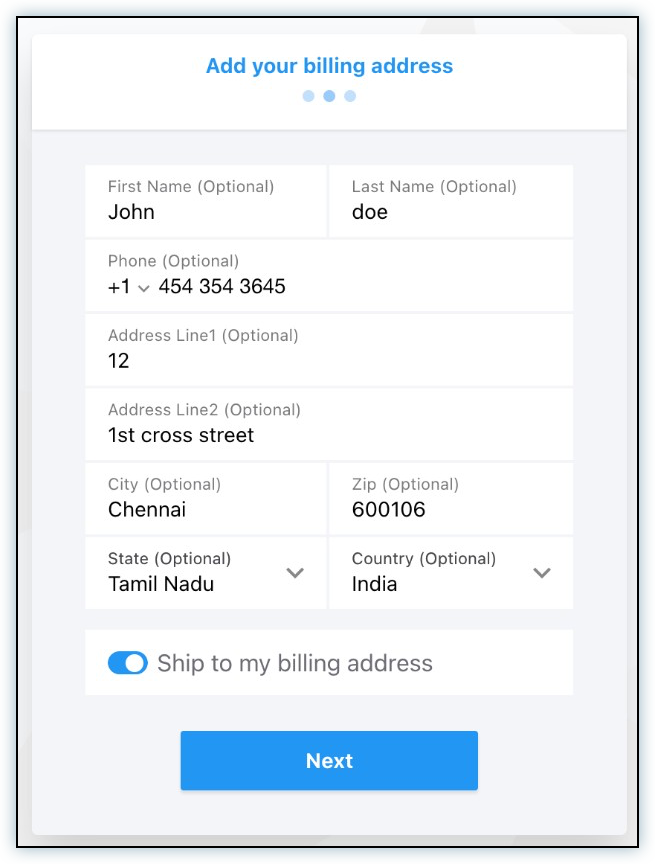
- The customer enters their billing address and clicks Next.
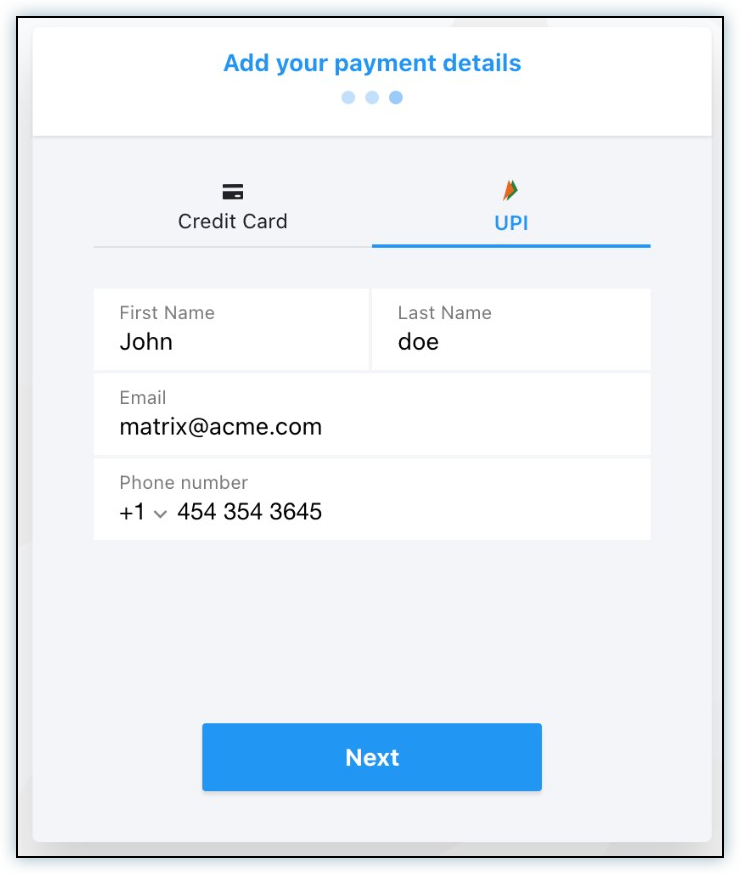
- The customer selects UPI on the Add your payment details page, enters the required payment details, and clicks Next.
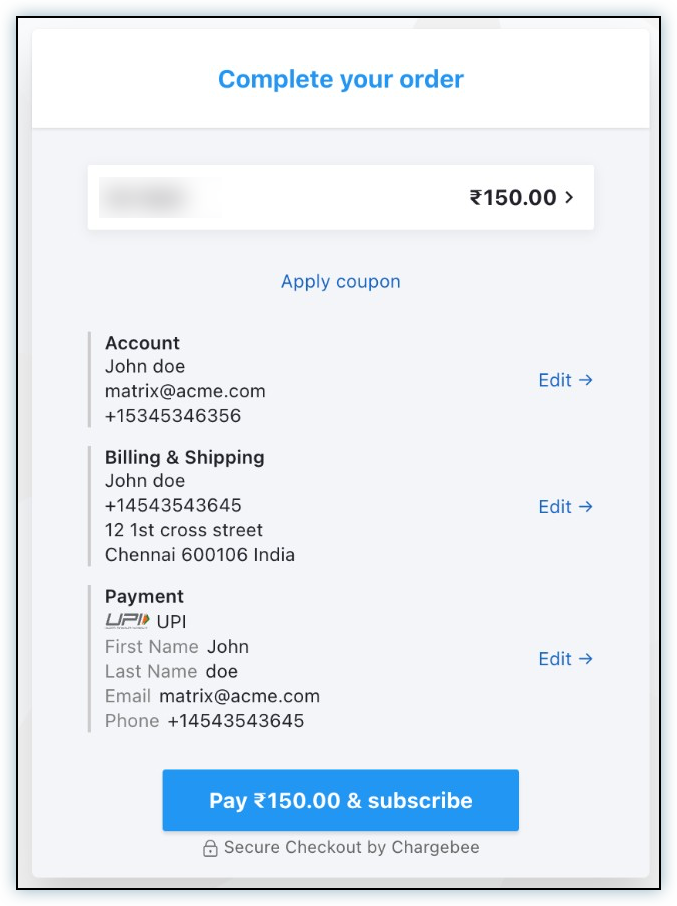
- The customer reviews the full order summary on the Complete your order page—including account details, billing address, and UPI payment details—and clicks Pay & Subscribe.
- The customer authorizes the payment and mandate in their UPI app. On desktop, a QR code is displayed to scan. On mobile, Stripe automatically hands off to an installed UPI app.
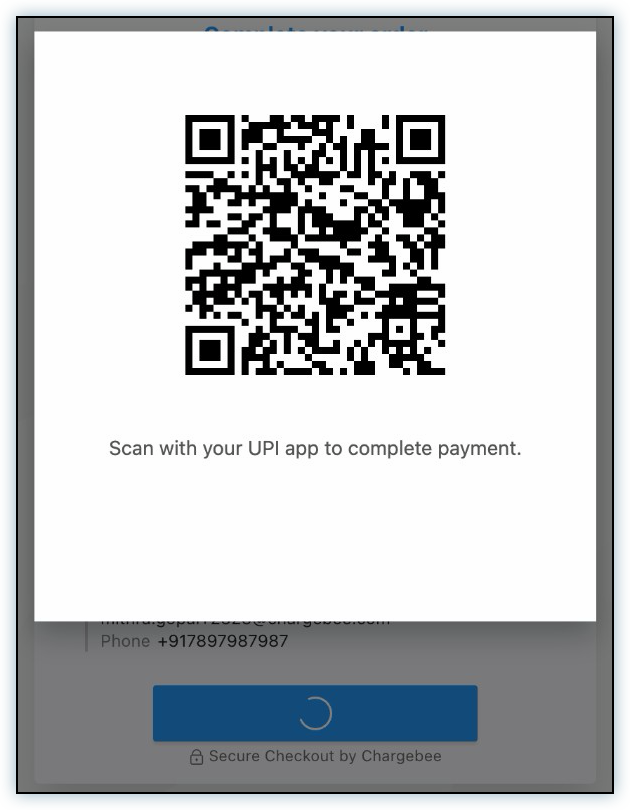
- After the customer scans and approves, the subscription is created. The payment and mandate setup complete automatically and the page shows a Close button.
Note
The screenshots above show the UPI checkout flow in Stripe's test environment. In production, customers scan the QR code in their real UPI app.
Transaction amount limits
UPI is a push payment method. Stripe applies different per-transaction limits depending on whether the charge is customer-present (CIT) or off-session (MIT), and whether a recurring mandate is being set up.
| Flow | Max per charge | Customer action |
|---|---|---|
| One-time UPI (no mandate setup) | ₹1,00,000 | Authorize in UPI app (QR on desktop, app handoff on mobile) |
| CIT with mandate setup (subscription checkout) | ₹15,000 | Authorize in UPI app |
| MIT off-session (subscription renewals) | ₹15,000 | None |
Note
The mandate authorization maximum (up to ₹1,00,000) and the ₹15,000 per-transaction cap for recurring flows are independent limits. A higher mandate authorization does not allow MIT or mandate-creating CIT charges above ₹15,000. Charges above ₹15,000 in recurring flows are rejected with amount_too_large.
Recurring payments and mandate behavior
When a customer completes UPI checkout in Chargebee, a UPI mandate is automatically set up. This mandate authorizes Chargebee to collect future subscription renewal charges as off-session MIT transactions—without requiring the customer to scan a QR code each time, as long as each renewal is ₹15,000 or less.
Mandate details
| Mandate property | Value |
|---|---|
| Amount type | Maximum — variable recurring amounts within the pre-authorization ceiling (not a fixed charge amount) |
| Mandate authorization maximum | Up to ₹1,00,000 (customer pre-authorization ceiling; per-transaction caps below still apply) |
| Per-transaction MIT auto-debit limit | ₹15,000 |
| Per-transaction CIT limit (mandate-creating checkout) | ₹15,000 |
| Billing interval | Derived from the subscription plan frequency |
Customer-initiated transactions (CIT)
UPI is a push payment method. Every customer-present charge requires the customer to authorize in their UPI app—via QR code on desktop or app handoff on mobile—regardless of amount or whether a UPI payment method is already saved. The PaymentIntent returns requires_action even for saved payment methods.
This applies to first-time checkout, portal subscription changes, and any other on-session charge. Auto-debit without customer action applies only to MIT (off_session) flows.
Merchant-initiated transactions (MIT)
Once the mandate is set up, Chargebee collects subscription renewals automatically as off-session MIT transactions. No customer action is required for renewals up to ₹15,000.
Renewals above ₹15,000 are rejected by Stripe with amount_too_large. Off-session charges above this limit are not supported at this time. When Stripe rejects the renewal, the invoice payment fails and Chargebee applies real-time payments dunning (and the configured final action after the dunning window). Collect the higher amount through a new customer-present checkout, or lower the renewal amount.
Chargebee checkout and portal behavior
| Flow | Stripe UPI support |
|---|---|
| New subscription checkout | Supported (CIT with mandate setup) |
| Existing customer checkout | UPI available for new mandate setup; saved Stripe UPI is not offered |
| Pay invoice (Collect Now) | One-time UPI only; payment method is not saved |
| Self-serve portal — edit subscription | Supported (CIT with QR / app handoff) |
| Self-serve portal — add payment method | Not supported |
Failed payments and dunning
Stripe UPI uses a real-time payments dunning model. Per Stripe, each new PaymentIntent triggers a fresh pre-debit notification (PDN) cycle with a 24–36 hour processing window before the actual debit—including partner-side retries, regardless of amount.
Chargebee does not run standard auto-collect retry schedules for Stripe UPI (no Chargebee UPI retry intervals). When an MIT renewal fails, dunning follows the real-time payments configuration under Settings > Configure Chargebee > Dunning for Online Payments—including the UPI dunning window (days) and final actions. See Dunning.
Note
Stripe recommends waiting for payment_intent.payment_failed before retrying, spacing new PaymentIntents 2–3 days apart, and capping total retry attempts at 2–3 over 7–10 days.
Payment features
The following features are supported for UPI via Stripe.
| Feature | Description | Supported | Default state | Configuration or behavior |
|---|---|---|---|---|
| Integration sync mode | Defines how payment requests are processed and statuses are communicated between Chargebee and Stripe. | Yes (synchronous) | Synchronous | Chargebee waits for the customer to authorize the payment in their UPI app in-session (QR code on desktop, app handoff on mobile). The subscription is created only after the customer completes authorization. |
| Capture settings | Payment processing involves two stages: authorization and capture. Capture settings determine when funds are collected after authorization. | Yes | Auto capture | Auto capture is the default and only supported capture setting for UPI via Stripe. Funds are collected immediately after the customer approves the QR code. |
| Recurring billing (MIT) | Automatic off-session collection for subscription renewals using a saved mandate. | Yes | Enabled after initial CIT mandate setup | Chargebee collects renewals automatically using the UPI mandate set up during checkout. Supported for renewals up to ₹15,000 per transaction. |
| Statement descriptor | Displays the business name on the customer's bank statement, helping them recognize charges and reducing disputes. | Yes | Disabled | Configure this under Settings > Configure Chargebee > Transaction Descriptor. |
| Refunds | Reversal of a collected payment back to the customer. | Yes | Available | Full and partial refunds are supported. Configure Stripe webhooks with the charge.refund.updated event to ensure refund status is reflected accurately in Chargebee. |
| Chargeback management | Handles chargeback events and applies configured actions on invoices and subscriptions. | No | Not applicable | UPI dispute handling is not supported in Chargebee. If a customer raises a dispute, issue a refund manually through your Stripe dashboard. |
| Fraud management | Uses gateway fraud signals to identify and flag high-risk transactions. | No | Not applicable | No UPI-specific fraud configuration is available in Chargebee. |
| Error intelligence | Provides standardized categorization of payment failures. | Yes | Enabled | Available through Stripe payment responses. No configuration is required. |
| Gateway transaction details | Provides access to raw gateway responses for transactions. | Yes | Enabled | Available on the transaction page under Error details. No configuration is required. |
| Adding payment methods in the Chargebee dashboard | Allows a payment method to be added in Chargebee when details are collected outside checkout. | No | Not applicable | UPI payment methods cannot be added from the Chargebee dashboard. Customers must complete the UPI checkout or portal flow to set up a mandate. |
Supported token formats
This section is relevant if you're building a custom checkout or migrating payment methods from another provider to Stripe.
| Token type | Description | Supported | Token field | Token format |
|---|---|---|---|---|
| Chargebee Payment Intent | Recommended token format when building a custom checkout using Chargebee.js. | Yes | payment_intent[id] | payment_intent_id |
| Chargebee token | Legacy token format supported for selected payment methods and gateways with Chargebee.js. Not recommended for new implementations. | No | token_id | Not applicable |
| Gateway permanent token | Permanent reference provided by the gateway for saved payment methods. | Yes | payment_method[reference_id] | Stripe Payment Method ID (pm_...) |
| Gateway temporary token | Short-lived token format that can be converted to a permanent token. | No | Not applicable | Not applicable |
Testing
Sandbox testing
Refer to Stripe's UPI documentation for instructions on testing UPI in the Stripe test environment. In test mode, QR code scanning is simulated automatically without requiring a real UPI app.
Make sure webhooks are configured to receive the charge.refund.updated event for refund settlement updates.
Recommended test scenarios:
| Scenario | Expected result |
|---|---|
| CIT checkout ≤ ₹15,000 with mandate setup | Success after UPI app authorization |
| CIT checkout > ₹15,000 with mandate setup | amount_too_large |
| MIT off-session renewal ≤ ₹15,000 | Success without customer action |
| MIT off-session renewal > ₹15,000 | amount_too_large |
| CIT with saved UPI payment method (any amount) | requires_action with QR / app handoff |
Production testing
Before you go live:
- Make sure UPI is enabled in your Stripe live account.
- Verify Smart Routing routes INR payments to your Stripe gateway under the For UPI section.
- Verify that webhook configuration is complete with the
charge.refund.updatedevent. - Run end-to-end testing using a real UPI-enabled bank account and a mobile device with a UPI app installed.
- Test new checkout (CIT with QR flow), a renewal scenario (MIT off-session ≤ ₹15,000), and a failed renewal to confirm real-time payments dunning behavior.
Reconciliation
For financial reconciliation between Chargebee and Stripe, use the Chargebee transaction field id_at_gateway, which maps to the Stripe PaymentIntent ID. Retrieve that value from the Chargebee transaction details, then locate the matching transaction in your Stripe Dashboard or reports.
Limitations and important points
- Currency: UPI via Stripe supports INR only. Transactions in any other currency are not supported.
- Geography: UPI is available for customers with Indian bank accounts with UPI enabled. Customers must have a UPI-supported bank app (Google Pay, PhonePe, Paytm, etc.).
- Per-transaction limits: One-time UPI supports up to ₹1,00,000. Mandate-creating checkout and MIT renewals are capped at ₹15,000 per transaction, regardless of the mandate authorization maximum.
- CIT always requires UPI app authorization: Every customer-present charge requires authorization in the UPI app—even with a saved payment method. Auto-debit without customer action applies only to MIT off-session flows.
- MIT hard ceiling: Off-session renewals above ₹15,000 are rejected with
amount_too_large. There is no off-session 2FA path at this time. - Saved UPI in existing checkout: Chargebee does not offer saved Stripe UPI payment methods during existing-customer checkout or Pay invoice flows.
- QR code expiry: The QR code expires after approximately 5 minutes. If not scanned in time, the customer must restart checkout.
- No UPI ID entry: Chargebee's UPI integration uses Stripe's QR code flow. Customers do not need to enter their UPI Virtual Payment Address (VPA/UPI ID) during checkout.
- Dunning retries: Per Stripe, each new PaymentIntent for a failed UPI charge triggers a fresh pre-debit notification cycle (24–36 hours), even for small amounts. Chargebee does not schedule standard UPI auto-collect retries.
- Portal add payment method: Stripe UPI cannot be added directly from the self-serve portal. Customers can use UPI when editing a subscription, or during checkout.
Was this article helpful?