New in Chargebee: Explore Reveal and understand your payment performance end-to-end.Try Now
Docschargebee docs
HomeBillingCPQPaymentsRevRecGrowthReveal
Support

Product Updates


  • Release Notes

Getting Started with RevRec


  • About Chargebee RevRec
  • Quick Start Guide
  • Site Configuration
  • Conversion
  • RevRec Essential
  • Articles and FAQ

Revenue Recognition


  • Configuring Product Catalog
  • Standalone Selling Price
  • Configuring Revenue Rules
  • Recognizing Discounts
  • Revenue Arrangement
  • Prior Period Adjustment
  • Pending Collectibility
  • Chargebee Billing Features
  • Articles and FAQ

Expense Recognition


  • Recognizing Expenses
  • Articles and FAQ

Multi Currency


  • Multi-Currency
  • Articles and FAQ

Multi Entity


  • Multi-Entity

Data Processing & Validation


  • Overview
  • Automated Data Synchronization
  • Importing Data in Bulk
  • Input via User Interface
  • Control Checks
  • Automated Import and Export
  • Understanding Errors
  • Articles and FAQ

Adjustments


  • Manual Adjustments

Reports & Analytics


  • Overview of RevRec Reporting
  • RevRec Standard Reports
  • Articles and FAQ

General Ledger & Accounting Close


  • Journal Account Mapping
  • Understanding Journal Entries
  • Creating Journal Entries
  • Journal Posting & Closing Accounting Period
  • Articles and FAQ

Integrations


  • HubSpot
  • Salesforce
  • QuickBooks Online
  • Xero
  • Sage Intacct
  • NetSuite
  • Stripe
  • Mobile Stores
  • Articles and FAQ

RevRec Premium


  • Overview
  • Quick Start Guide
  • Site Configuration
  • Getting Around RevRec Premium
  • General Ledger & Accounting Close
  • Reports & Analytics
  • Integrations
  1. RevRec
  2. Revenue Recognition
  3. Articles and FAQ
  4. Revenue Recognition
  1. RevRec
  2. Revenue Recognition
  3. Articles and FAQ
  4. Revenue Recognition

Zero Dollar Invoice Sync RevRec

Summary:

Zero Dollar Invoice from Chargebee Billing should sync in RevRec.

Solution:

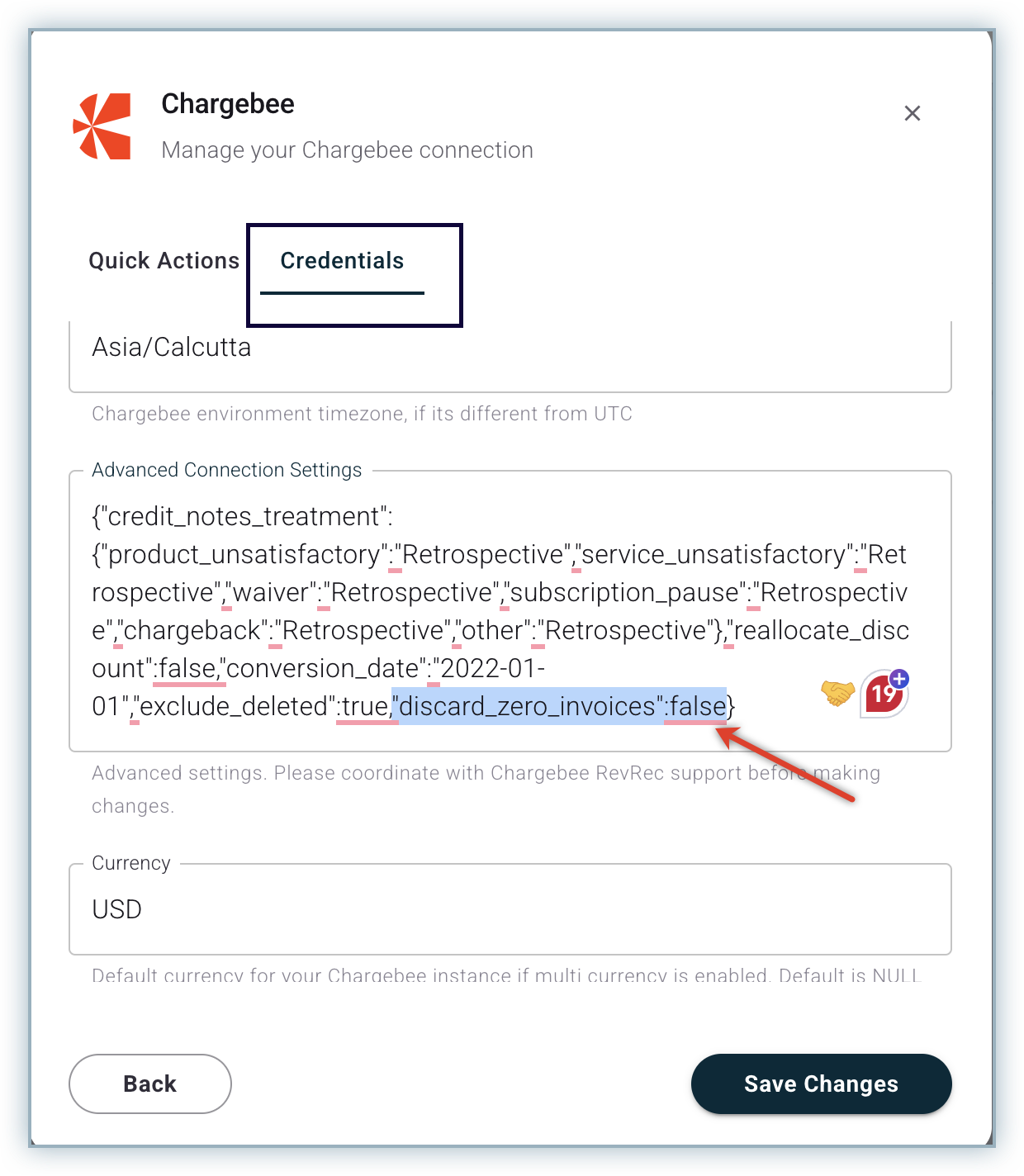
For a zero-dollar invoice to sync in RevRec, the user can add the property below in the Advanced Connection Settings, which is present under Connection parameters.

"discard_zero_invoices":false
image

Related Articles

What is the difference between default and advanced accounting treatment on the credit notes in RevRec?
What are the revenue recognition methods in RevRec and their associated rules?
How to understand your revenue plans and their accounting in RevRec?
What are the types of Ratable Revenue Recognition plans in RevRec?
What are the standalone selling price rules in RevRec?
How to check the customers revenue plan on RevRec?
What is the Standalone Selling Price in RevRec?
How to check consumption based Revenue Recognition in RevRec?
How to maintain your SSP library?
How is the Percent Net Revenue Reallocation is calculated in RevRec?
How is the decreased subscription value within the billing period is calculated in RevRec?
How to configure Product Catalog in RevRec?
How to reconcile Delivery data and Invoice data in RevRec?
What does the 'Unbilled Receivable' amount represent in RevRec?
What is SSP Versioning in RevRec?
Enable passthrough feature for products in Revrec
RevRec - Accounting Journal Posting
What is SSP Analyzer in RevRec?
Zero Dollar Invoice Sync RevRec

Show more

Was this article helpful?