Provider-level fee insights
Provider-level fee insights in Reveal Settlements Fees is the view inside a single Gateway Account. After Fees shows which accounts are expensive on a blended-rate basis, this view explains why: which payment methods drive volume and fees, how fee components stack up, what platform fees apply beyond per-transaction charges, and where outlier fees concentrate.
Finance and payments teams use it to decide whether to renegotiate, change payment-method mix, or move volume between Gateway Accounts, using the same settlement currency and date range as the Fees overview.
To open it, go to Settlements > Fees, then select a Gateway Account tab (each connected processor account appears next to Overview).
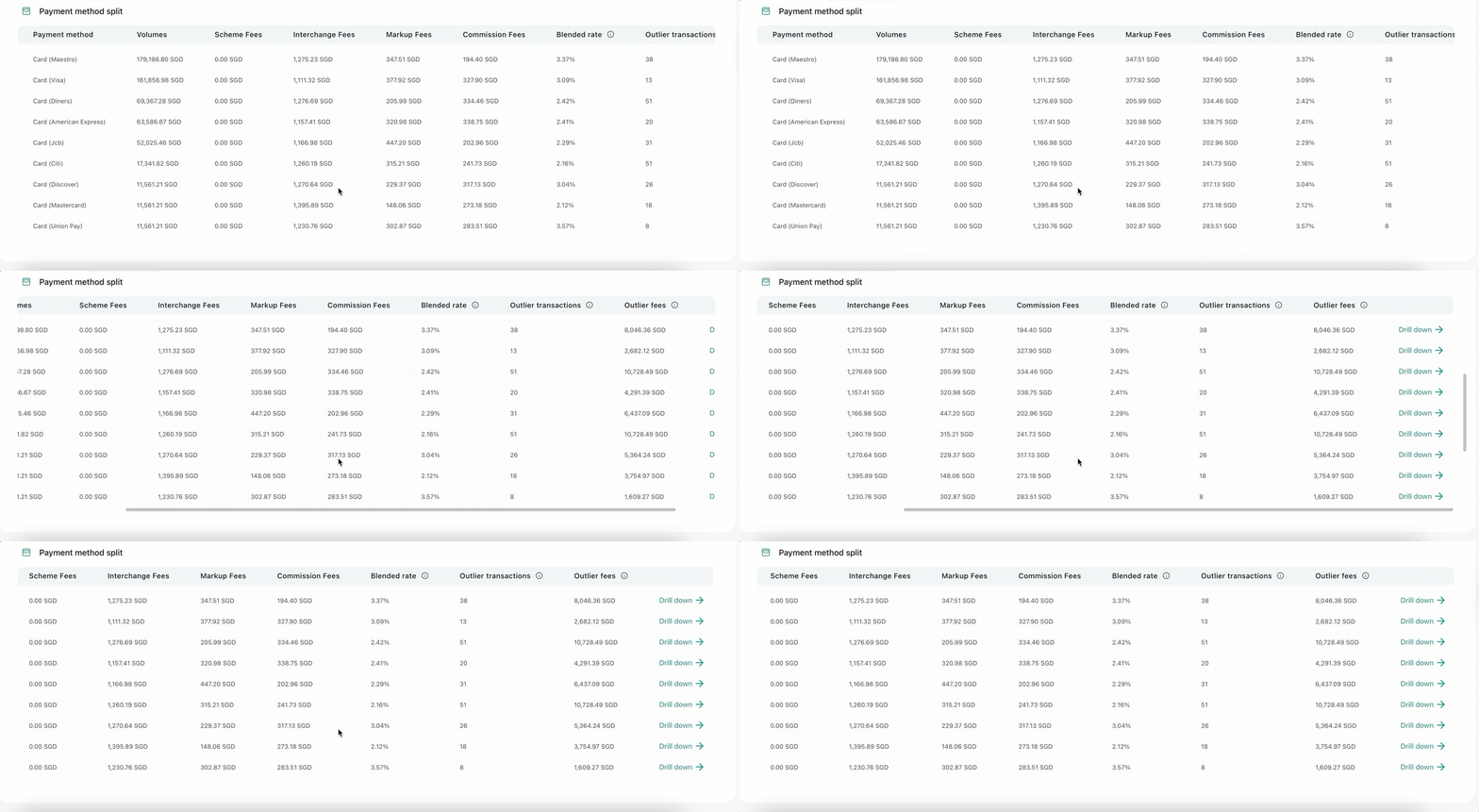
[Add gif: Gateway Account Fees tab — Payment method split table with Volumes, Scheme/Interchange/Markup/Commission Fees, Blended rate, Outlier transactions, and Outlier fees]
Why this view matters
The Fees overview answers which Gateway Account to investigate. Provider-level insights answer what to change:
- Which payment methods carry the highest blended rates or the most outlier fees.
- Whether cost is coming from interchange-style transaction fees, platform fees, or both.
- Whether a minority of rails or card brands is pulling the account’s effective rate up.
- Whether you have a clear segment for a processor conversation, a product decision about which methods to promote, or a routing change.
Without this breakdown, teams often cut volume on an entire Gateway Account or accept higher fees as fixed, instead of fixing the mix or platform services that drive the variance.
What you can learn inside a Gateway Account
For the selected period and settlement currency, the provider view is organized around three lenses.
Fee composition and outlier concentration
Under Overview on the Gateway Account tab, Reveal shows:
- Fees split: how cost breaks across fee types reported for that account (for example Scheme Fees, Interchange Fees, Markup Fees, and Commission Fees when present in your data, plus platform fee line items where applicable).
- Outlier fees: how outlier fee amount concentrates by payment method and card brand, so leakage is visible even when total dollars look acceptable.
[Add screenshot: Gateway Account Fees tab — Fees split and Outlier fees charts side by side]
Payment method split
Payment method split lists each payment method (and card brand when applicable) with:
- Volumes for that rail.
- Fee component columns such as Scheme Fees, Interchange Fees, Markup Fees, and Commission Fees when your processor data includes them.
- Blended rate for that method.
- Outlier transactions and Outlier fees so expensive methods stand out even when total volume looks healthy.
Use this table when you need to compare Visa vs Mastercard, card vs local rail, or any other mix shift that changed cost. Click Drill down on a row when you need the settled transactions behind that method before you act, or continue in Records for a broader export.
Platform fees
Platform fees lists fee components that sit outside ordinary per-transaction pricing (for example fraud tools, account services, and similar charges from your processor data), with the Volumes attributed to each component.
[Add screenshot: Gateway Account Fees tab — Platform fees table with Fee component and Volumes]
These charges can move the account’s blended rate even when interchange-style fees look stable. Definitions for related terms are in the standard terms glossary.
Narrow the review without losing context
Keep the date range and Settlement Currency aligned with the question you are answering so you compare like with like. When a Gateway Account settles in more than one currency, review one settlement currency at a time.
Use More filters when you need to separate traffic that often prices differently, for example by Transaction Currency (domestic vs cross-border charge currency). Additional dimensions such as card classification or transaction origin appear when they are available for your site.
[Add screenshot: Fees More filters panel — Transaction Currency filter expanded]
How this fits a Settlements cost review
- Compare Gateway Accounts on Fees.
- Open provider-level insights for the account that drives cost or outlier leakage.
- Form a clear hypothesis (mix, platform fees, or pricing), then confirm in Records or against Reconciliation when the bank net has to match.
Take the next step
- Fees: Return to blended-rate comparison across Gateway Accounts.
- Outliers: Understand fee leakage above your average rate.
- Records: Inspect and export settled transactions for accounting workflows.
- Reconciliation: Tie fee totals back to what settled to the bank.
Was this article helpful?